
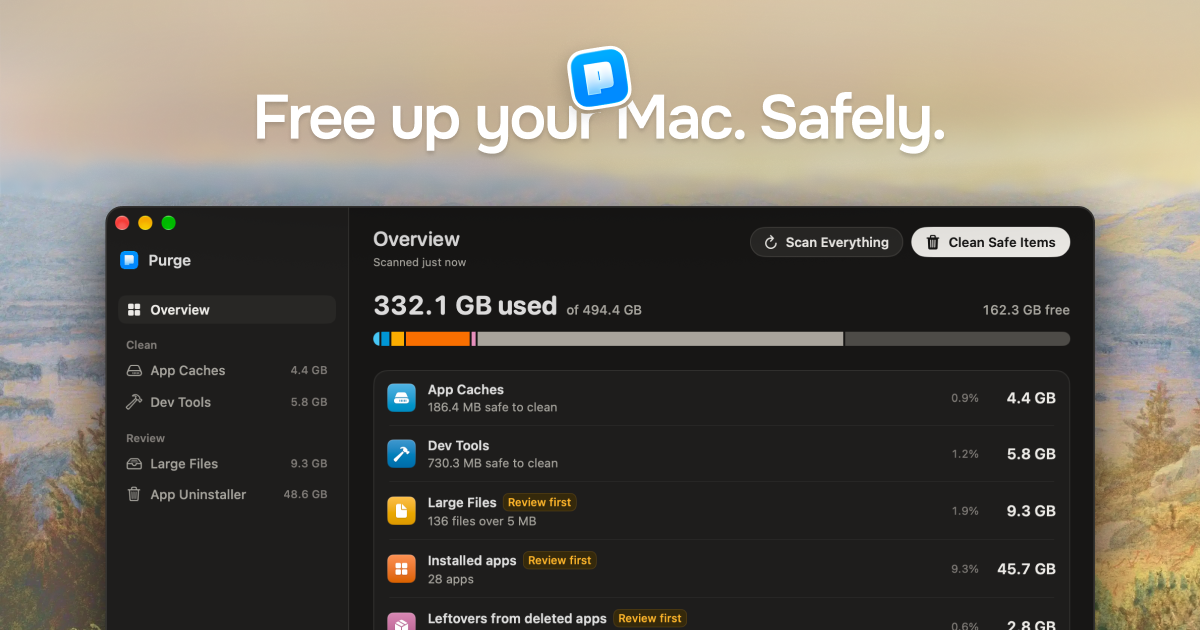
What Purge App does
It safely clears files, including app caches, temporary files, and large files.
Purge is designed to be sure of what it clears, and it only lists what it recognizes.
Who it is for
Pricing model: Open source. Is Purge App free? Check current plans ↗
Signals
Health Score
Health Score 80 · based on 55 of 100 methodology points (55% coverage). Missing signals are omitted, not scored as zero.
Purge App's score uses only signals already on file. Missing Lighthouse, reviews or a 7-day availability window are omitted, not scored as zero. This is not a stored badge fact.
How the Health Score is calculated →- Availability10/10
1 of 1 daily checks succeeded (100.0%). Tracking since 2026-11-28; the full 25-point window opens after 7 days.
Recorded - Lighthouse performanceomitted
No Lighthouse performance score has been recorded.
Not recorded - Lighthouse qualityomitted
No Lighthouse SEO, accessibility or best-practices scores have been recorded.
Not recorded - HTTP Observatory9/20
Mozilla HTTP Observatory grade C.
Needs attention - HTTPS5/5
The official listing URL uses HTTPS.
Recorded - Community5/5
No published reviews (omitted) · 730 community awards.
Recorded - Listing completeness10/10
Description, tagline, logo, category and official URL are all on file.
Recorded - Check freshness5/5
Last recorded HTTP check was today.
Recorded
Key features
Facts
Company
- Founded2026
Pros and cons
Pros
- Open-source pricing modelOfficial website, recorded at listing time
- Open source (MIT)https://github.com/jithin-sabu/purge-app
- safe to usehttps://purgemac.com/
Platforms & integrations
How Purge App compares






Ratings & reviews
Used this tool? Share a specific experience to help the next person.
Security & trust
Open source
License: MIT · 21 open issues and pull requests
Last commit today
Popularity over time
GitHub stars
2,039
2026-11-28 – 2026-11-28 · https://github.com/jithin-sabu/purge-app
What's new
- Purge v1.18.1
Purge v1.18.1 allows users to look inside a folder on the Everything else map to see the folders inside it by size.
- Purge v1.18.0
Purge v1.18.0 lists old rustup toolchains in Dev Tools that aren't the default and have no override or project names.
- Purge v1.17.0
Purge v1.17.0 adds a new list in Settings for other folders and drives to scan, which also applies to Large Files and Developer Projects.
- Purge v1.16.2
Purge v1.16.2 fixes the issue of downloading Apple Intelligence models on macOS 27.2 and also fixes an issue with Apple Intelligence models.
- Purge v1.16.1
Purge v1.16.1 fixes a launch crash that occurred a few seconds after opening during the first scan.
Availability
100.0% of 1 observed checks responded · daily snapshots
Common questions
Is Purge safe to use?
Caches are cleared only from a fixed allowlist, and anything Purge doesn't recognize never shows up. For large files and apps, nothing goes until you confirm. Files go to the Trash by default. A few items, like iOS simulators and Time Machine snapshots, are removed for good. The never-touch list shows what it refuses, generated from the app's own allowlist.
What does it clear?
App caches, Xcode derived data, and other developer tool junk, plus leftovers from apps you remove and large files or duplicates you pick yourself. One-click and scheduled cleans only touch items marked Safe to clean. It can also remove older Time Machine snapshots after you confirm. It keeps the newest one, and removed snapshots skip the Trash, so they can't be restored. Our system data guide covers the rest.
Can it run on its own?
If you want. Scheduled cleaning clears Safe items on a schedule you pick, and Purge can review leftovers whenever you delete an app. Both are off by default.
Will it delete anything permanently?
Only a few things. Purge moves files to the Trash, and emptying it is a separate action you take yourself. iOS simulators, simulator runtimes, local Time Machine snapshots and Apple Intelligence models are the exceptions. Those are removed for good, not moved to the Trash.
Why didn't my free space go up right away?
Moving files to the trash doesn't free disk blocks. The space comes back when you empty the trash. Purge shows what's sitting in the trash so the number isn't a surprise. If system data in Storage barely moved, how to shrink system data covers what Purge didn't touch.
How is it different from other cleaners?
It won't guess. Purge never deletes permanently, never touches files it can't identify, and skips projects you're still working on. By default it quits when you close the window. For a fair comparison with paid suites like CleanMyMac, see our CleanMyMac comparison.
Is it really free?
Yes. No license, no trial, no paid tier, nothing bundled in. The full source is on GitHub if you want to read it.
Does Purge collect any data?
No analytics, no telemetry, no crash reporting. The only network request is the update check, and you can turn that off.
Does Purge need Full Disk Access?
Not to get started. Caches and dev junk scan without it. Purge asks after your first clean, to unlock large files and app leftovers.
How do I uninstall it?
In Settings, switch off launch at login, deleted-app review, and admin-locked app removal. Then drag Purge to the trash.
What is Purge App?
Purge is a free, open-source Mac cleaner that clears cache and junk. It helps users free up disk space and remove leftover files. Purge is suitable for Mac users.
What is the Maker Crown Health Score for Purge App?
Health Score 80 · based on 55 of 100 methodology points (55% coverage). Missing signals are omitted, not scored as zero.
How is Purge App priced?
Open source. Check the official pricing page for current plans and terms.
Is there a free plan for Purge App?
The product is listed as open source.
Is Purge App free?
It is listed as open source. The directory lists Purge App as open source. That does not always mean hosted use is free. We do not have a detailed official plan snapshot on file. Check the official site for current terms; recorded pricing can change and is not a quote.
Who is Purge App for?
Best for: Mac users, developers.
What is Purge App best for?
The listing records Purge App as best for Mac users, developers. That line comes from the catalog record, not from a Maker Crown test.
What can Purge App do?
Recorded features: clears cache, removes app leftovers, safely deletes junk files, moves files to the Trash. Empty fields mean we have not recorded that fact.
What are the best Purge App alternatives?
Other tools in the same category in this catalog include Latxa, ID@Xbox, Cursor, GitBook. They are ranked by community awards, then recorded popularity, and the list is not a paid placement.
What category is Purge App listed in?
Purge App is filed under Developer Tools in the Maker Crown catalog. You can browse every live Developer Tools tool from the category page, and free options have their own list.
Where can I find more Developer Tools tools?
The Developer Tools category page lists every live Developer Tools tool in the catalog. The free and open-source lists narrow that to recorded pricing, and alternatives pages show what sits next to Purge App.
When was Purge App last checked?
The listing was last checked 18 hours ago (28 November 2026). Every fact on the page carries the date it was recorded, and the method is documented at /how-we-test.
How does Maker Crown rank tools?
By community awards first, then recorded popularity (a Tranco rank when we have one), then discovery signal. It is not a paid ranking, and empty fields mean we have not recorded that fact.
Add a Maker Crown badge to your website. Every badge is a dofollow link back to this tool's page.
Claim this listing and add a badge or a makercrown-verify meta tag on your domain to earn Verified on Maker Crown. Verify ownership →
On this listing
Listed on Maker Crown
Every live listing can show this badge.

<a href="https://makercrown.com/tool/purge-app?ref=badge" target="_blank" rel="noopener"><img src="https://makercrown.com/badge/purge-app/listed.svg?theme=light" alt="Purge App is listed on Maker Crown" width="300" height="72" /></a>
Featured in a category
Listed tools with a known category get a category badge and icon.

<a href="https://makercrown.com/tool/purge-app?ref=badge" target="_blank" rel="noopener"><img src="https://makercrown.com/badge/purge-app/category.svg?theme=light" alt="Purge App is featured in Developer Tools on Maker Crown" width="300" height="72" /></a>
Upvote counter
A live count of community awards (upvotes) on Maker Crown.

<a href="https://makercrown.com/tool/purge-app?ref=badge" target="_blank" rel="noopener"><img src="https://makercrown.com/badge/purge-app/upvotes.svg?theme=light" alt="Purge App has 730 community awards on Maker Crown" width="300" height="72" /></a>
Earned
Open Source Hero
The listing is marked open source, or we have a recorded GitHub stars fact for it.

<a href="https://makercrown.com/tool/purge-app?ref=badge" target="_blank" rel="noopener"><img src="https://makercrown.com/badge/purge-app/opensource.svg?theme=light" alt="Purge App is an Open Source Hero on Maker Crown" width="300" height="72" /></a>