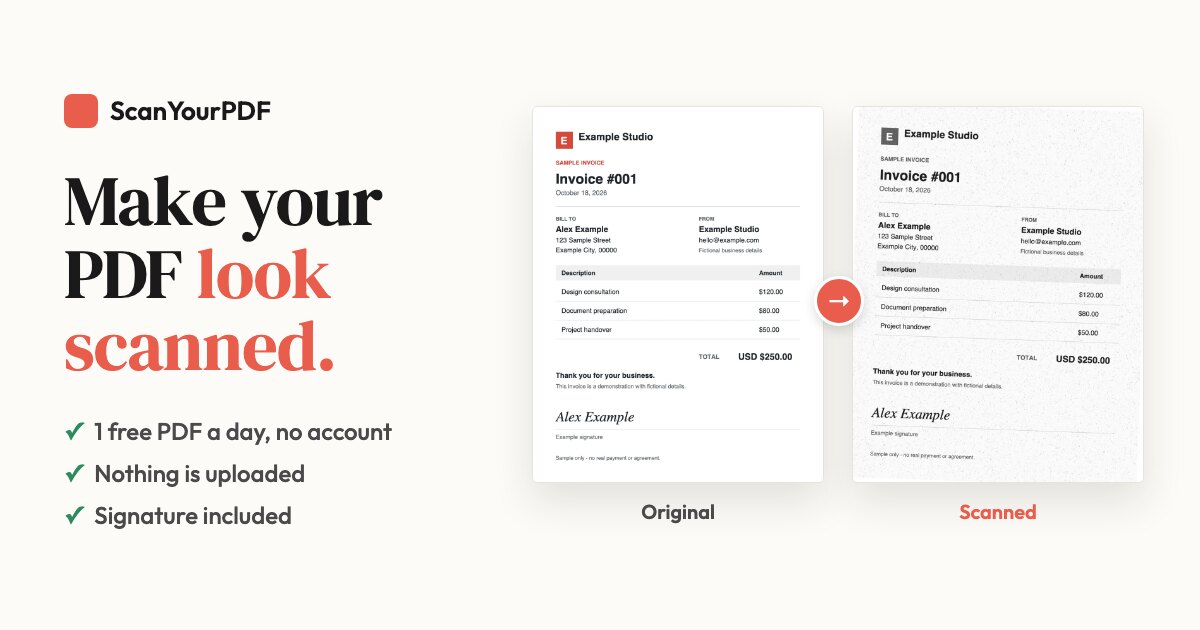
What Make Your PDF Look Scanned does
Make Your PDF Look Scanned is a tool that makes a PDF look scanned in your browser. You can add a natural scan effect and your own signature. It helps users who need to make their PDFs look scanned.
Who it is for
Pricing model: Free plan. Is Make Your PDF Look Scanned free? Check current plans ↗
Signals
Health Score
Health Score 68 · based on 70 of 100 methodology points (70% coverage). Missing signals are omitted, not scored as zero.
Make Your PDF Look Scanned's score uses only signals already on file. Missing Lighthouse, reviews or a 7-day availability window are omitted, not scored as zero. This is not a stored badge fact.
How the Health Score is calculated →- Availability21.4/25
6 of 7 daily checks succeeded (85.7%).
Recorded - Lighthouse performanceomitted
No Lighthouse performance score has been recorded.
Not recorded - Lighthouse qualityomitted
No Lighthouse SEO, accessibility or best-practices scores have been recorded.
Not recorded - HTTP Observatory2/20
Mozilla HTTP Observatory grade D-.
Failing - HTTPS5/5
The official listing URL uses HTTPS.
Recorded - Community4.3/5
No published reviews (omitted) · 10 community awards.
Recorded - Listing completeness10/10
Description, tagline, logo, category and official URL are all on file.
Recorded - Check freshness5/5
Last recorded HTTP check was today.
Recorded
Key features
Pros and cons
Pros
- Freemium pricing (free tier listed)Official website, recorded at listing time
How Make Your PDF Look Scanned compares
 Make Your PDF Look Scanned |  WPS Office |  Calendly |  JIRA Studio | |||
|---|---|---|---|---|---|---|
| Pricing | Free plan | — | Free | Free plan | — | — |
| Awards | 10 | 2325 | 5099 | 4177 | 2213 | 3638 |
| Origin | — | United States | Hong Kong | — | Australia | — |
| Founded | — | — | 1989 | 2013 | — | 2005 |
| Security | D- | B+ | D | C | B | F |
Make Your PDF Look Scanned vs Dropbox PaperMake Your PDF Look Scanned vs WPS OfficeMake Your PDF Look Scanned vs Calendly


Ratings & reviews
Used this tool? Share a specific experience to help the next person.
Security & trust
Popularity over time
Maker Crown global rank
Weighted 30-day community awards + 0.01 × views + 0.1 × clicks. Category rank #267.
Availability
85.7% of 7 observed checks responded · daily snapshots
Common questions
What is Make Your PDF Look Scanned?
Make Your PDF Look Scanned is a tool that makes a PDF look scanned in your browser. You can add a natural scan effect and your own signature. It helps users who need to make their PDFs look scanned.
What is the Maker Crown Health Score for Make Your PDF Look Scanned?
Health Score 68 · based on 70 of 100 methodology points (70% coverage). Missing signals are omitted, not scored as zero.
How is Make Your PDF Look Scanned priced?
Free plan. Check the official pricing page for current plans and terms.
Is there a free plan for Make Your PDF Look Scanned?
Yes. The listing records a freemium model; check the official site for the current free tier.
Is Make Your PDF Look Scanned free?
Not entirely. The directory lists Make Your PDF Look Scanned as freemium (a free plan alongside paid options). We do not have a detailed official plan snapshot on file. Check the official site for current terms; recorded pricing can change and is not a quote.
Who is Make Your PDF Look Scanned for?
Best for: Individuals, Small businesses.
What is Make Your PDF Look Scanned best for?
The listing records Make Your PDF Look Scanned as best for Individuals, Small businesses. That line comes from the catalog record, not from a Maker Crown test.
What can Make Your PDF Look Scanned do?
Recorded features: No upload required, Add natural scan effect, Add your own signature. Empty fields mean we have not recorded that fact.
What are the best Make Your PDF Look Scanned alternatives?
Other tools in the same category in this catalog include Dropbox Paper, WPS Office, Calendly, JIRA Studio. They are ranked by community awards, then recorded popularity, and the list is not a paid placement.
What category is Make Your PDF Look Scanned listed in?
Make Your PDF Look Scanned is filed under Productivity in the Maker Crown catalog. You can browse every live Productivity tool from the category page, and free options have their own list.
Where can I find more Productivity tools?
The Productivity category page lists every live Productivity tool in the catalog. The free and open-source lists narrow that to recorded pricing, and alternatives pages show what sits next to Make Your PDF Look Scanned.
When was Make Your PDF Look Scanned last checked?
The listing was last checked 1 hour ago (24 November 2026). Every fact on the page carries the date it was recorded, and the method is documented at /how-we-test.
How does Maker Crown rank tools?
By community awards first, then recorded popularity (a Tranco rank when we have one), then discovery signal. It is not a paid ranking, and empty fields mean we have not recorded that fact.
Add a Maker Crown badge to your website. Every badge is a dofollow link back to this tool's page.
Claim this listing and add a badge or a makercrown-verify meta tag on your domain to earn Verified on Maker Crown. Verify ownership →
On this listing
Listed on Maker Crown
Every live listing can show this badge.
<a href="https://makercrown.com/tool/make-your-pdf-look-scanned?ref=badge" target="_blank" rel="noopener"><img src="https://makercrown.com/badge/make-your-pdf-look-scanned/listed.svg?theme=light" alt="Make Your PDF Look Scanned is listed on Maker Crown" width="300" height="72" /></a>
Featured in a category
Listed tools with a known category get a category badge and icon.
<a href="https://makercrown.com/tool/make-your-pdf-look-scanned?ref=badge" target="_blank" rel="noopener"><img src="https://makercrown.com/badge/make-your-pdf-look-scanned/category.svg?theme=light" alt="Make Your PDF Look Scanned is featured in Productivity on Maker Crown" width="300" height="72" /></a>
Upvote counter
A live count of community awards (upvotes) on Maker Crown.
<a href="https://makercrown.com/tool/make-your-pdf-look-scanned?ref=badge" target="_blank" rel="noopener"><img src="https://makercrown.com/badge/make-your-pdf-look-scanned/upvotes.svg?theme=light" alt="Make Your PDF Look Scanned has 10 community awards on Maker Crown" width="300" height="72" /></a>
Earned
Open Source Hero
The listing is marked open source, or we have a recorded GitHub stars fact for it.
<a href="https://makercrown.com/tool/make-your-pdf-look-scanned?ref=badge" target="_blank" rel="noopener"><img src="https://makercrown.com/badge/make-your-pdf-look-scanned/opensource.svg?theme=light" alt="Make Your PDF Look Scanned is an Open Source Hero on Maker Crown" width="300" height="72" /></a>