What Macos Sysdata does
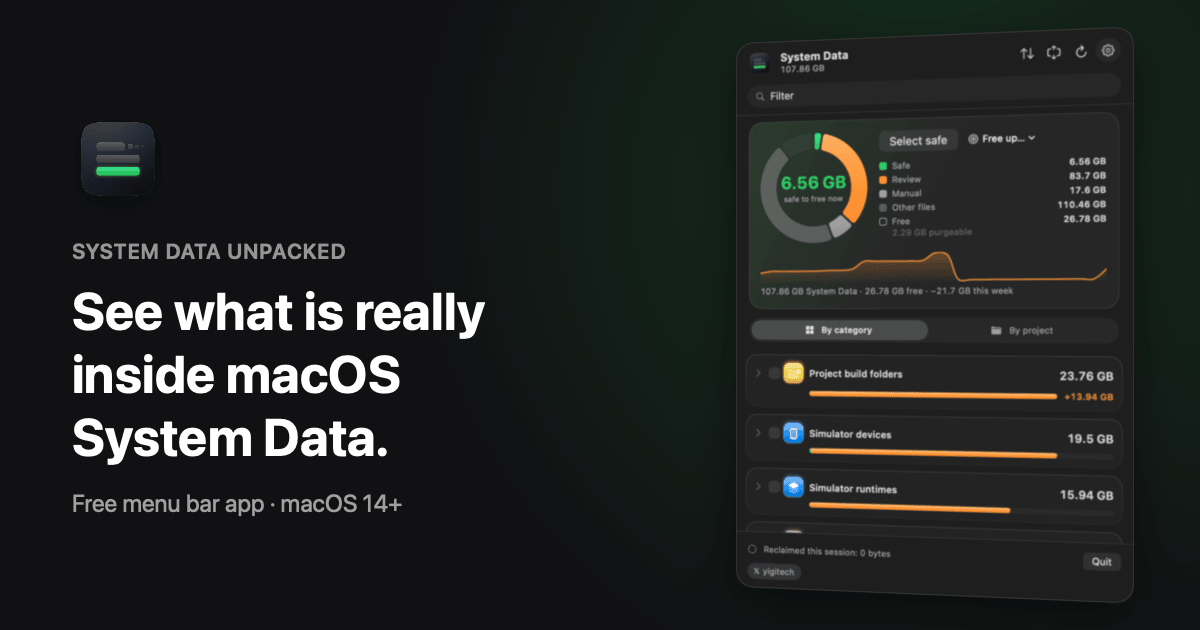
System Data Unpacked is an app that opens and allows users to manage macOS System Data.
The app shows what is inside System Data, including simulators, Xcode builds, package caches, AI models, and backups, and lets users delete or shrink it item by item.
System Data Unpacked is designed for Mac users, particularly developers, who want to free up space on their devices.
The app provides a safe way to manage System Data, with features such as showing every command before it runs and allowing users to review items before deleting them.
Who it is for
Pricing model: Free. Is Macos Sysdata free? Check current plans ↗
Signals
Health Score
Health Score 80 · based on 55 of 100 methodology points (55% coverage). Missing signals are omitted, not scored as zero.
Macos Sysdata's score uses only signals already on file. Missing Lighthouse, reviews or a 7-day availability window are omitted, not scored as zero. This is not a stored badge fact.
How the Health Score is calculated →- Availability10/10
2 of 2 daily checks succeeded (100.0%). Tracking since 2026-11-28; the full 25-point window opens after 7 days.
Recorded - Lighthouse performanceomitted
No Lighthouse performance score has been recorded.
Not recorded - Lighthouse qualityomitted
No Lighthouse SEO, accessibility or best-practices scores have been recorded.
Not recorded - HTTP Observatory9/20
Mozilla HTTP Observatory grade C.
Needs attention - HTTPS5/5
The official listing URL uses HTTPS.
Recorded - Community5/5
No published reviews (omitted) · 69 community awards.
Recorded - Listing completeness10/10
Description, tagline, logo, category and official URL are all on file.
Recorded - Check freshness5/5
Last recorded HTTP check was today.
Recorded
Key features
Product
Gallery
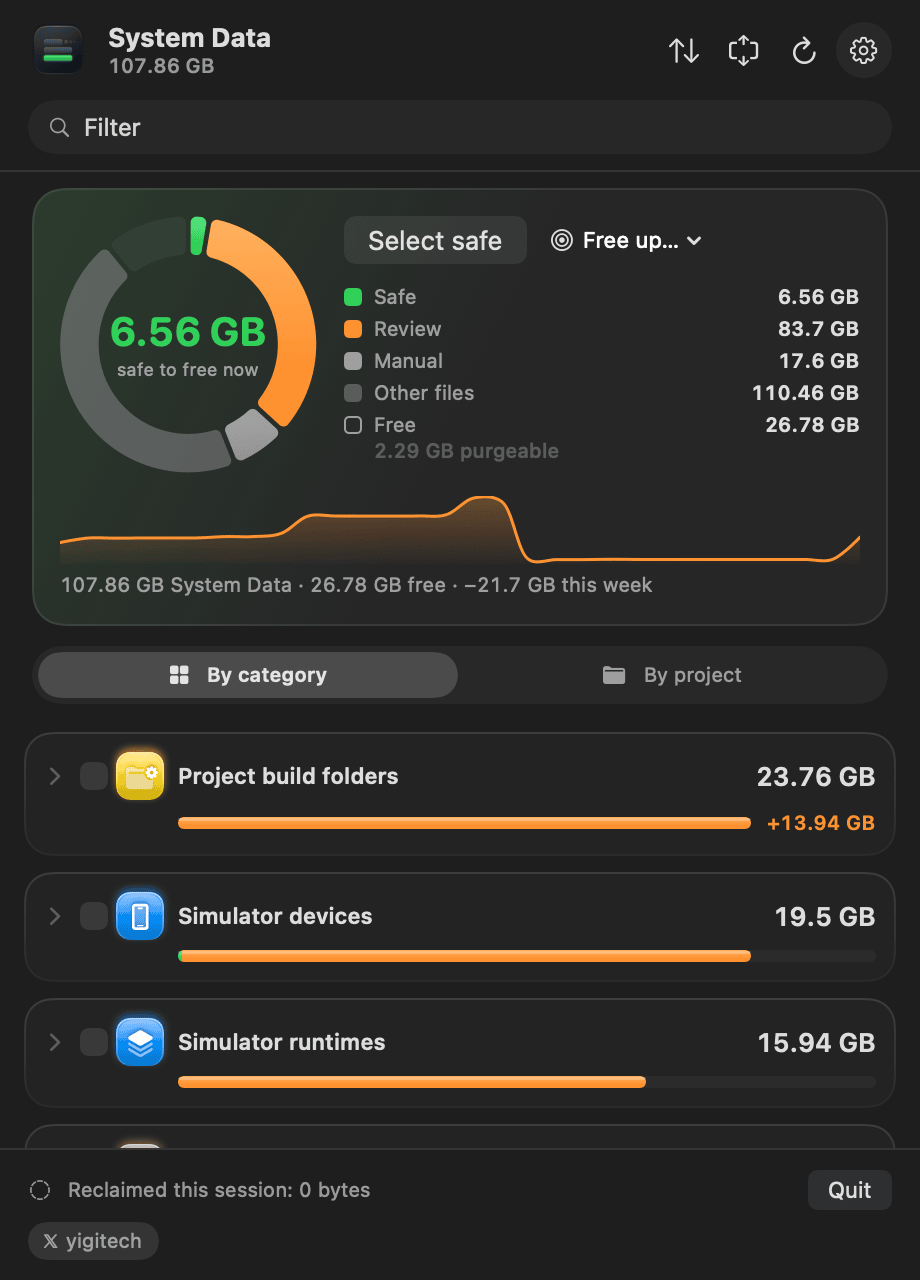
Image: official site
Facts
Company
- Founded2026
Pros and cons
Pros
- Listed as freeOfficial website, recorded at listing time
- Open source (NOASSERTION)https://github.com/Jarvis322/macos-sysdata
- Available on macOSOfficial website
- allows users to manage System Data safelyhttps://macos-sysdata.yigitech.dev/
- provides a way to shrink System Data without deleting anythinghttps://macos-sysdata.yigitech.dev/
Cons
- requires Full Disk Access to function fullyhttps://macos-sysdata.yigitech.dev/
Platforms & integrations
How Macos Sysdata compares
 Macos Sysdata |  ID@Xbox |  Cursor |  GitBook | |||
|---|---|---|---|---|---|---|
| Pricing | Free | Open source | — | — | Free plan | — |
| Awards | 69 | 1146 | 1372 | 2243 | 350 | 1585 |
| Origin | — | Spain | United States | — | — | — |
| Founded | 2026 | — | — | — | — | 2013 |
| Security | C | B- | C | B | F | F |
Macos Sysdata vs LatxaMacos Sysdata vs ID@XboxMacos Sysdata vs Cursor



Ratings & reviews
Used this tool? Share a specific experience to help the next person.
Security & trust
Open source
License: NOASSERTION · 0 open issues and pull requests
Last commit 4 days ago
Popularity over time
GitHub stars
2,353
2026-11-28 – 2026-11-28 · https://github.com/Jarvis322/macos-sysdata
What's new
- v1.13.3
Hard-linked files are counted once in v1.13.3.
- v1.13.2
A few folders were marked safe that are not in v1.13.2.
- v1.13.1
The menu bar switch works from the window in v1.13.1.
- v1.13.0
Every item in the delete confirmation now says whether it rebuilds on this Mac in v1.13.0.
- v1.12.0
Scrolling a large scan, opening a category and pointing at cards no longer rebuild the whole list in v1.12.0.
Availability
100.0% of 2 observed checks responded · daily snapshots
Common questions
What is System Data on a Mac?
System Data is the name Storage settings gives to everything it cannot file under Apps, Photos or Documents: caches, logs, simulator runtimes, local Time Machine snapshots, disk images, mail attachments and application support folders.
Why is my System Data so large?
On a Mac used for development it is usually a handful of folders: Xcode DerivedData and archives, simulator runtimes, npm and Homebrew caches, Docker disks and downloaded models. Each regenerates on demand, and together they pass 100 GB.
Can I delete System Data?
Parts of it. Caches and build folders regenerate on their own. Snapshots and device backups are a decision rather than a cleanup. System Data Unpacked labels every item and shows the command before it runs.
How do I clear System Data on a Mac?
Find out what it is made of first, because it differs from Mac to Mac. System Data Unpacked lists every part with its size and a badge: delete the Safe items, which rebuild on their own, review the rest, and empty the Trash to get the space back.
Can I free space without deleting anything?
Yes, for folders that are mostly read, such as SDKs, archives, old IDE versions and a project's dependencies. System Data Unpacked can shrink them with the file system compression macOS uses for its own files, often to around half their size. The files stay where they are and nothing is deleted.
Why does it ask for Full Disk Access?
Most of System Data sits in folders macOS protects, and without the grant they cannot be measured. The app reads sizes and dates, not the contents of files, and never mail, messages or browsing history. It also works without the grant, with those places left out.
What is Macos Sysdata?
Macos Sysdata is a free menu bar app that explains every category of macOS System Data and shows each command before it runs. It helps you delete system data item by item. It assists developers and users in managing system data.
What is the Maker Crown Health Score for Macos Sysdata?
Health Score 80 · based on 55 of 100 methodology points (55% coverage). Missing signals are omitted, not scored as zero.
How is Macos Sysdata priced?
Free. Check the official pricing page for current plans and terms.
Is there a free plan for Macos Sysdata?
The listing records this product as free.
Is Macos Sysdata free?
Yes, according to the records we hold. The directory lists Macos Sysdata as free. We do not have a detailed official plan snapshot on file. Check the official site for current terms; recorded pricing can change and is not a quote.
Who is Macos Sysdata for?
Best for: developers, mac users.
What is Macos Sysdata best for?
The listing records Macos Sysdata as best for developers, mac users. That line comes from the catalog record, not from a Maker Crown test.
What can Macos Sysdata do?
Recorded features: delete system data item by item, shrink system data without deleting, shows every command before it runs, scans in the background and remembers what changed. Empty fields mean we have not recorded that fact.
What are the best Macos Sysdata alternatives?
Other tools in the same category in this catalog include Latxa, ID@Xbox, Cursor, GitBook. They are ranked by community awards, then recorded popularity, and the list is not a paid placement.
What category is Macos Sysdata listed in?
Macos Sysdata is filed under Developer Tools in the Maker Crown catalog. You can browse every live Developer Tools tool from the category page, and free options have their own list.
Where can I find more Developer Tools tools?
The Developer Tools category page lists every live Developer Tools tool in the catalog. The free and open-source lists narrow that to recorded pricing, and alternatives pages show what sits next to Macos Sysdata.
When was Macos Sysdata last checked?
The listing was last checked 5 hours ago (29 November 2026). Every fact on the page carries the date it was recorded, and the method is documented at /how-we-test.
How does Maker Crown rank tools?
By community awards first, then recorded popularity (a Tranco rank when we have one), then discovery signal. It is not a paid ranking, and empty fields mean we have not recorded that fact.
Add a Maker Crown badge to your website. Every badge is a dofollow link back to this tool's page.
Claim this listing and add a badge or a makercrown-verify meta tag on your domain to earn Verified on Maker Crown. Verify ownership →
On this listing
Listed on Maker Crown
Every live listing can show this badge.

<a href="https://makercrown.com/tool/macos-sysdata?ref=badge" target="_blank" rel="noopener"><img src="https://makercrown.com/badge/macos-sysdata/listed.svg?theme=light" alt="Macos Sysdata is listed on Maker Crown" width="300" height="72" /></a>
Featured in a category
Listed tools with a known category get a category badge and icon.

<a href="https://makercrown.com/tool/macos-sysdata?ref=badge" target="_blank" rel="noopener"><img src="https://makercrown.com/badge/macos-sysdata/category.svg?theme=light" alt="Macos Sysdata is featured in Developer Tools on Maker Crown" width="300" height="72" /></a>
Upvote counter
A live count of community awards (upvotes) on Maker Crown.

<a href="https://makercrown.com/tool/macos-sysdata?ref=badge" target="_blank" rel="noopener"><img src="https://makercrown.com/badge/macos-sysdata/upvotes.svg?theme=light" alt="Macos Sysdata has 69 community awards on Maker Crown" width="300" height="72" /></a>
Earned
Open Source Hero
The listing is marked open source, or we have a recorded GitHub stars fact for it.

<a href="https://makercrown.com/tool/macos-sysdata?ref=badge" target="_blank" rel="noopener"><img src="https://makercrown.com/badge/macos-sysdata/opensource.svg?theme=light" alt="Macos Sysdata is an Open Source Hero on Maker Crown" width="300" height="72" /></a>