Personal
17.4
- 1 device

Offline media tools
Pimosa is a desktop app for video, audio, images, and PDFs that allows users to compress, convert, resize, trim, merge, edit, download, transcribe, and strip metadata without separate apps.
The app works offline, with all processing happening on the user's computer, and no files are uploaded to convert.
Pimosa offers a range of tools, including video, audio, image, and PDF tools, as well as a batch queue and an optional AI agent.
The app is available for Mac and Windows, with a one-time purchase and lifetime updates, and a 7-day money-back guarantee.
Who it is for
Signals
Health Score 96 · based on 70 of 100 methodology points (70% coverage). Missing signals are omitted, not scored as zero.
I completed shipping my desktop app's score uses only signals already on file. Missing Lighthouse, reviews or a 7-day availability window are omitted, not scored as zero. This is not a stored badge fact.
How the Health Score is calculated →8 of 8 daily checks succeeded (100.0%).
RecordedNo Lighthouse performance score has been recorded.
Not recordedNo Lighthouse SEO, accessibility or best-practices scores have been recorded.
Not recordedMozilla HTTP Observatory grade A+.
RecordedThe official listing URL uses HTTPS.
RecordedNo published reviews (omitted) · 2 community awards.
RecordedDescription, tagline, logo, category and official URL are all on file.
RecordedLast recorded HTTP check was today.
RecordedProduct
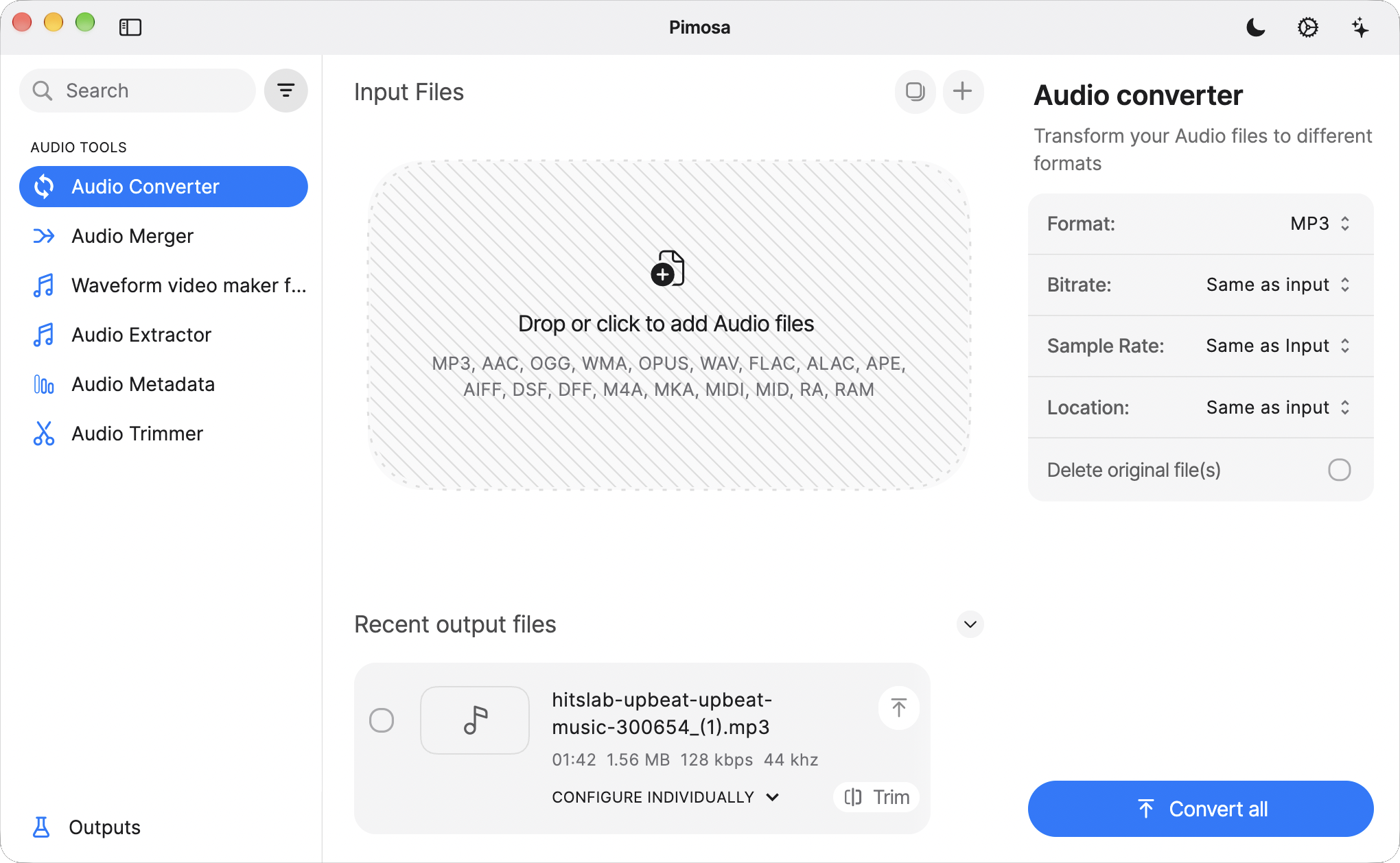
Image: official site
Plans
Is I completed shipping my desktop app free?
17.4
29.4
99
Prices are sourced snapshots. Check the official site for taxes, billing terms and current availability.
| I completed shipping my desktop app |  Flingo |  Kuaishou | ||||
|---|---|---|---|---|---|---|
| Pricing | Paid | — | — | — | — | — |
| Awards | 2 | 4143 | 2221 | 1549 | 1496 | 1224 |
| Origin | — | United States | — | — | — | — |
| Founded | — | 2014 | — | 2008 | 2015 | 2014 |
| Security | A+ | F | — | C | D- | C |
I completed shipping my desktop app vs Paramount+I completed shipping my desktop app vs DUNKI completed shipping my desktop app vs Flingo
Used this tool? Share a specific experience to help the next person.
Weighted 30-day community awards + 0.01 × views + 0.1 × clicks. Category rank #111.
Black Friday: 40% off, code BLACKFRIDAY40 applied automatically at checkout.
Open-source licenses
100.0% of 8 observed checks responded · daily snapshots
No. Pimosa is a toolkit first: every tool works with a click, offline. The AI agent is an optional side panel, and it does nothing until you choose a model.
It can be free. Run a local model in Ollama or LM Studio at no cost, or use your own OpenRouter key and pay that provider only for what you use. There's no Pimosa subscription.
A desktop app for video, audio, images, and PDFs. Compress, convert, resize, trim, merge, edit, download, transcribe, and strip metadata without a pile of separate apps.
Work happens on your computer. Nothing is uploaded to convert files. Transcription uses a model downloaded to your computer. The AI chat uses whatever model you connect (OpenRouter, Ollama, LM Studio, or another OpenAI-compatible API).
macOS 12.4 or later (Apple Silicon) and Windows.
Pay once. Personal is 1 device, Plus is 3 devices, Team is 5 seats. Lifetime updates, no subscription. A 7-day money-back guarantee.
You need a license key to process files. OpenRouter needs your own API key if you use that provider. Local models do not.
In Agent mode it can find files and run the batch tools: compress, convert, resize, merge, and the other queue tools. In Ask mode it only looks, and does not change files. It cannot operate the timeline editors. You bring your own model via OpenRouter, Ollama, LM Studio, or a custom OpenAI-compatible API.
Yes. AI / Agent settings include an MCP server other apps can connect to while Pimosa is open, including a Cursor config you can copy.
There is no license. Setup may be incomplete — use Reconfigure in Settings. For transcription, the model is still downloading. For the agent, no model is selected or the local server is not running.
Pimosa is a desktop app that provides offline video, audio, image, and PDF tools. It helps users compress, convert, trim, and caption media files on Mac and Windows. Pimosa is for individuals who need to work with media files offline.
Health Score 96 · based on 70 of 100 methodology points (70% coverage). Missing signals are omitted, not scored as zero.
Paid. Check the official pricing page for current plans and terms.
No, according to the records we hold. The latest official plan snapshot we hold (recorded 25 November 2026) lists paid plans only (Personal, Plus, Team); it does not include a plan priced at zero. The directory lists I completed shipping my desktop app as paid. Check the official site for current terms; recorded pricing can change and is not a quote.
Best for: Individuals, Media professionals.
The listing records I completed shipping my desktop app as best for Individuals, Media professionals. That line comes from the catalog record, not from a Maker Crown test.
Recorded features: Video compressor, Audio converter, Image converter, PDF tools. Empty fields mean we have not recorded that fact.
Other tools in the same category in this catalog include Paramount+, DUNK, Flingo, Kuaishou. They are ranked by community awards, then recorded popularity, and the list is not a paid placement.
I completed shipping my desktop app is filed under Video in the Maker Crown catalog. You can browse every live Video tool from the category page, and free options have their own list.
The Video category page lists every live Video tool in the catalog. The free and open-source lists narrow that to recorded pricing, and alternatives pages show what sits next to I completed shipping my desktop app.
The listing was last checked just now (25 November 2026). Every fact on the page carries the date it was recorded, and the method is documented at /how-we-test.
By community awards first, then recorded popularity (a Tranco rank when we have one), then discovery signal. It is not a paid ranking, and empty fields mean we have not recorded that fact.
Add a Maker Crown badge to your website. Every badge is a dofollow link back to this tool's page.
Claim this listing and add a badge or a makercrown-verify meta tag on your domain to earn Verified on Maker Crown. Verify ownership →
Listed on Maker Crown
Every live listing can show this badge.

<a href="https://makercrown.com/tool/i-completed-shipping-my-desktop-app?ref=badge" target="_blank" rel="noopener"><img src="https://makercrown.com/badge/i-completed-shipping-my-desktop-app/listed.svg?theme=light" alt="I completed shipping my desktop app is listed on Maker Crown" width="300" height="72" /></a>
Featured in a category
Listed tools with a known category get a category badge and icon.

<a href="https://makercrown.com/tool/i-completed-shipping-my-desktop-app?ref=badge" target="_blank" rel="noopener"><img src="https://makercrown.com/badge/i-completed-shipping-my-desktop-app/category.svg?theme=light" alt="I completed shipping my desktop app is featured in Video on Maker Crown" width="300" height="72" /></a>
Upvote counter
A live count of community awards (upvotes) on Maker Crown.

<a href="https://makercrown.com/tool/i-completed-shipping-my-desktop-app?ref=badge" target="_blank" rel="noopener"><img src="https://makercrown.com/badge/i-completed-shipping-my-desktop-app/upvotes.svg?theme=light" alt="I completed shipping my desktop app has 2 community awards on Maker Crown" width="300" height="72" /></a>